Find the weights in your syllabus
Look for the percentage assigned to homework, quizzes, projects, midterms, and finals. You can also enter individual assignments when each one has its own weight.
Combine assignments, exams, and course categories with different weights—then see the score you need on your final.
Use either categories or individual assignments.
% weights mode — use this when your syllabus gives each category a percentage weight (e.g. Homework 20%, Final 40%). Enter each score as a percentage.
| Item or category | Grade | Weight |
|---|
Grades may be above 100% for extra credit. Weights should be between 0% and 100%.
| Item or category | Earned pts | Possible pts |
|---|
Enter the points you earned and the points possible for each item. Extra credit is fine — earned points may exceed possible points.
Look for the percentage assigned to homework, quizzes, projects, midterms, and finals. You can also enter individual assignments when each one has its own weight.
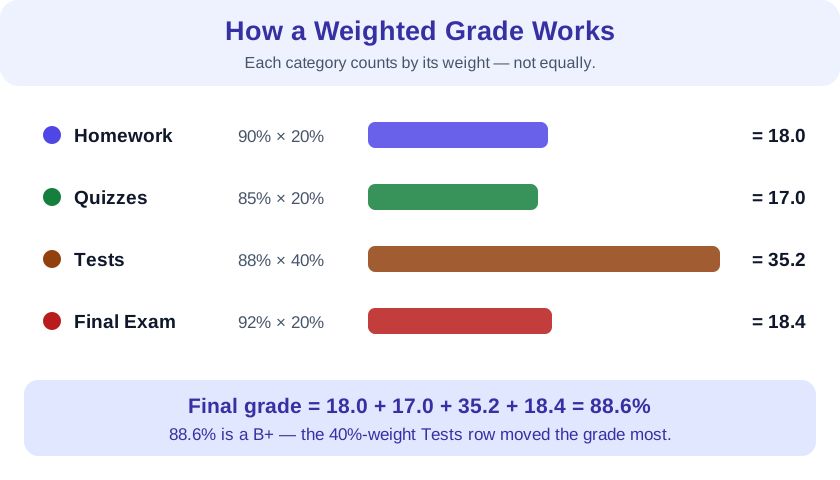
A score of 88% in a category worth 25% contributes 22 points to the course grade: 88 × 0.25 = 22.
If your weights total less than 100%, “current grade” normalizes only the work entered. “Course points earned” shows how many points those items contribute to the full course.
Suppose homework is 20% of the course, quizzes are 30%, and a midterm is 50%. Multiply each score by its decimal weight and add the contributions.
Switch the calculator above to Points mode when your syllabus lists raw points instead of percentage weights. Add up all earned points, add up all possible points, and divide. Larger assignments automatically count more because they contribute more possible points.
When to use which mode: use % weights when the syllabus says "Final = 40%"; use Points when it says "Final = 200 points out of 1000 total". Both modes give the same answer whenever the weights match the point proportions.
Some work counts more than others. A final worth 40% affects your result more than a quiz worth 5%, even if both are scored out of 100.
Every score counts equally. Add the scores and divide by the number of scores. This only works when all items carry the same importance.
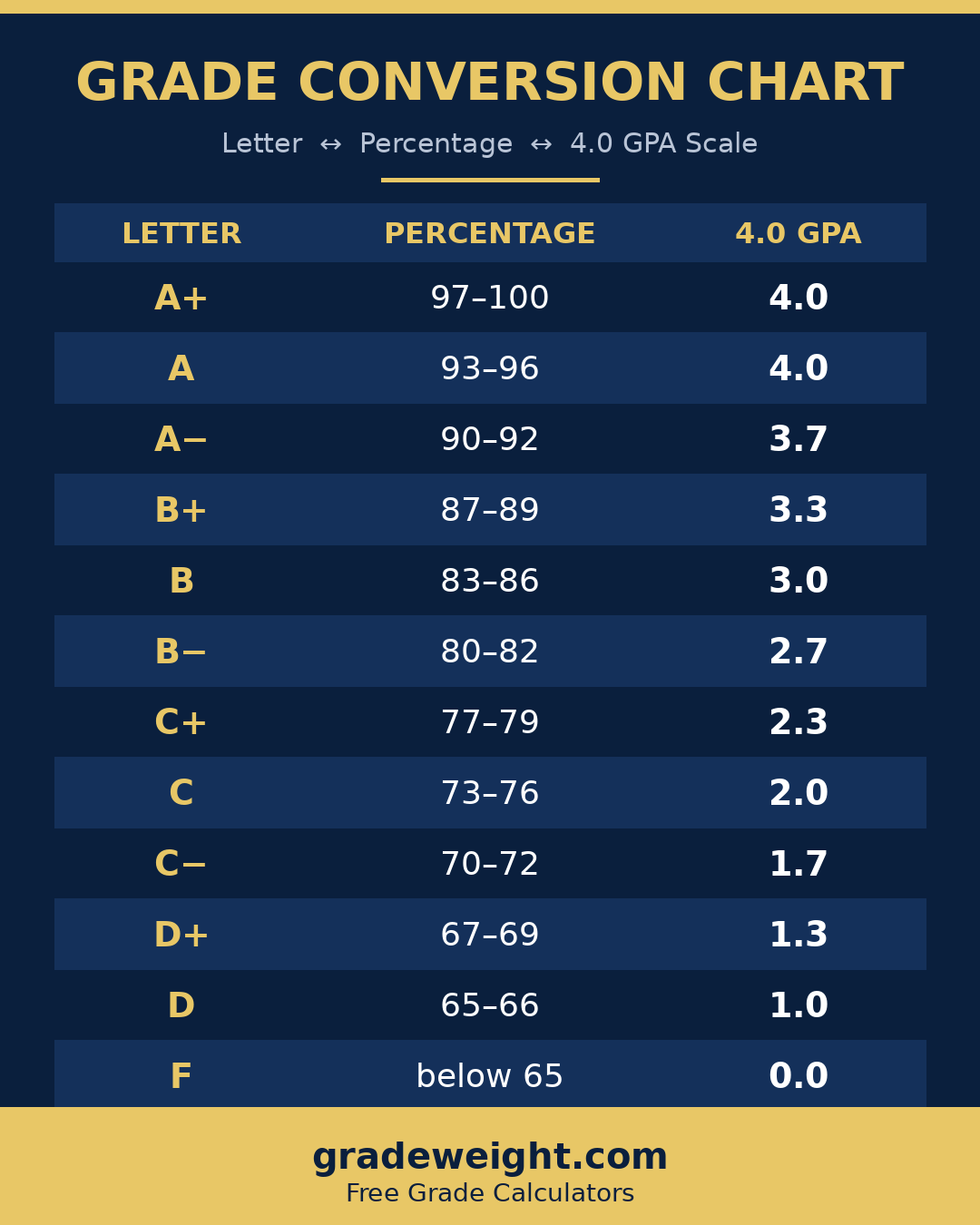
Copy the code below — a link back to gradeweight.com is appreciated.
<a href="https://gradeweight.com/"><img src="https://gradeweight.com/grade-conversion-chart.png" alt="Grade conversion chart — letter grade to percentage to 4.0 GPA" width="1080"></a>
Convert every weight from a percentage to a decimal, multiply each grade by its weight, and add the products. If the entered weights total less than 100%, divide the result by the total weight as a decimal to get your current grade on completed work.
That is normal when some work is not graded yet. This calculator shows both the normalized current grade and the points earned toward the full course. If all categories are included, recheck the syllabus because the weights should usually total 100%.
Use the “Final grade needed” tab. The calculation is: required final score = (desired overall grade − current grade × remaining course weight) ÷ final exam weight. Enter weights as percentages; the calculator handles the conversion.
Yes. A result above 100% means the target is not reachable under a standard 100-point final unless extra credit is available. A result below 0% means you have already secured the target even with a zero on the final.
Multiply the difference between the new score and your current grade by the assignment’s decimal weight. For example, scoring 10 points above your current grade on an assignment worth 20% raises the final course grade by about 2 points.
No. A weighted grade combines course components into one percentage. A weighted GPA adds extra grade points for honors, AP, or advanced courses according to a school’s own scale.
The displayed letter is a general reference: A = 90 and above, B = 80–89.99, C = 70–79.99, D = 60–69.99, and F = below 60. Your school or instructor may use a different scale, plus/minus grades, or rounding rules.
Yes. Enter each category — homework, quizzes, labs, exams — with its weight from your syllabus, and this grade calculator weighted by category computes your overall percentage instantly.
A weighted average grade calculator multiplies each score by its category weight, adds those products, and divides by the total weight. That is exactly what the calculator above does — your syllabus weights decide how much each part counts.
Yes — as a weighted class grade calculator, it accepts any categories your class uses — participation, projects, midterms — with any weights. If your weights do not total 100%, it normalizes the result so you see your current standing on completed work.
How to Calculate a Weighted Grade (Formula + Example)
What Grade Do I Need on My Final Exam? (Formula + Examples)
Simplify Calculator — Simplify Fractions & Square Roots
Square Root Calculator — Simplify Radicals with Steps
Factor Calculator — All Factors & Prime Factorization
Molarity Calculator — Solution Concentration (mol/L)
Class Average Calculator — Mean, Median & Standard Deviation